

How to Host a Vibe-Coded Website: 5 Options Compared
Quick answer: how do you host a vibe-coded website?
First check what your AI tool gave you. A single HTML file goes on any basic hosting plan or free static host. A full app from Lovable or Base44 either stays on the builder’s paid plan or gets exported to GitHub and deployed elsewhere. Your own domain works in every case.
The conversation almost always goes the same way.
Someone builds something over a weekend. It looks good. It works inside the preview window. Then they try to send the link to a client, or point their domain at it, and everything stops. They message us on a Monday.
Three things come up again and again. The first is cost. People assume the whole thing is free, because generating the site with ChatGPT or Claude was free, so surely putting it online is free too. The second is the technical gap. They build in Lovable, buy a domain somewhere else, then discover they also need business email on that domain, and the whole thing stalls in the DNS settings. The third is tool choice. They end up on the most expensive option available, or on something that genuinely does not suit them, like buying Google Workspace through a reseller when buying it directly from Google would have been simpler and cheaper.
None of that is a failure of the AI. The AI did its job. Hosting is just a separate problem, and nobody explained it.
This guide explains it. Five options, what each one actually costs, what the catch is in every case, and how to get from a file on your laptop to a live site on your own domain.
First, Work Out What Your AI Actually Built
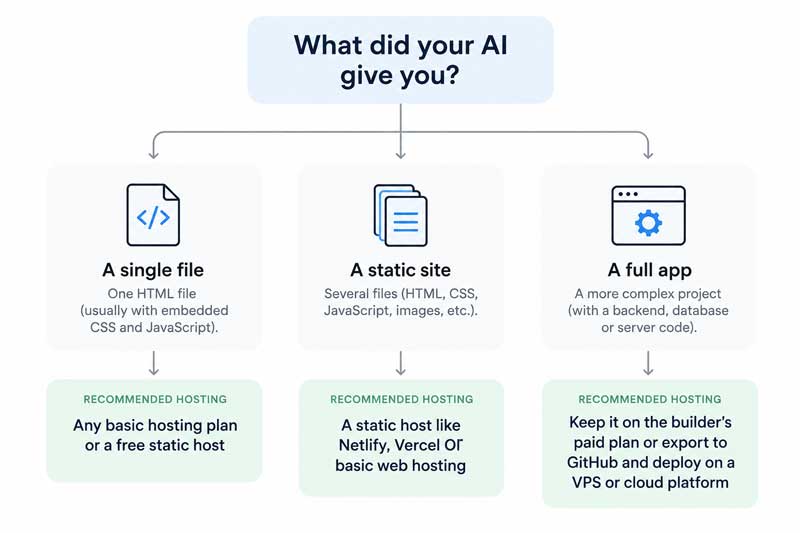
Before you compare hosts, look at what you are holding. Almost every hosting decision follows from this one question, and it is the step most people skip.
There are three possible answers.
A single HTML file
This is what you get from a Claude artifact, a ChatGPT canvas, or any chat where you asked for a landing page and downloaded the result. One file. Everything is inside it: the text, the styling, usually the JavaScript too.
This is the easiest case by a wide margin. A single HTML file will run on literally any hosting, including the cheapest shared plan and every free static host. It has no build step, no database, no server requirements. If this is what you have, your hosting bill can be almost nothing.
A static site with several files
A few HTML pages, a folder of images, maybe a stylesheet and a script file. Still no database and no login. Built by a chat tool over several prompts, or exported from a builder.
Also easy. Same options as above, you just upload a folder instead of a file. Keep the folder structure exactly as it was, and name the homepage index.html.
A full application
Logins, user accounts, a database, saved data, payments. This is what Lovable, Base44, Bolt and Replit typically produce when you ask for an app rather than a page.
This is a different problem, and it is the one that costs money. A full app needs somewhere to run code and somewhere to store data. It cannot simply be dropped into a folder on shared hosting. Your realistic options are to keep it on the builder that made it, or to export the code and deploy it on a platform built for applications.
Here is the rule worth remembering. If your site only displays things, hosting is cheap or free. The moment it stores things, hosting becomes a monthly cost. Most people who are frustrated by hosting prices built the second kind while assuming they had built the first.
The Five Ways to Host a Vibe-Coded Website
1. Leave it on the builder
The tool that built your site will usually host it too. This is the fastest route and the one that requires nothing new from you.
Lovable publishes to a lovable.app subdomain on the free plan. Connecting your own domain requires a paid plan, and so does exporting your code to GitHub. On the free plan every project is public, and you cannot take the code with you. That last point matters more than the price.
Pro costs $25 a month and includes 100 credits. Business is $50. Annual billing gives you two months free. Watch the credits rather than the headline price: every prompt spends them, unused ones roll over, and when they run out you either wait for next month or buy a top-up. A month of heavy building can cost noticeably more than $25.
Base44 includes hosting, publishes with a button, and lets you push the full source to your own GitHub repository at any time. The export covers both the frontend and the backend, which means you are not locked in even while you are paying.
Bolt.new, v0 and Replit all host what they build, and all support taking the code elsewhere, though the route differs in each. Check the export path before you commit to any of them, not after.
Hostinger Horizons is Hostinger’s own vibe-coding tool, and hosting is bundled into every plan.
The catch across all of them is the same. You are renting. Stop paying and the site goes with the subscription.
2. Buy a domain and basic hosting, then upload the files
The old-fashioned route, and for a simple site it is still the best one. You buy a domain and a shared hosting plan, upload your files, and you are done. No credits, no monthly message limits, no builder in the middle.
The files are yours. The domain is yours. Nobody can change the terms on you.
For a single-page site or a small brochure site, this usually works out cheaper over a year than any builder subscription, and most hosting plans throw in a free domain for the first year plus an SSL certificate and business email. That email point is worth noticing, because it is exactly where people building on Lovable get stuck. A builder gives you a website. A hosting plan gives you a website and [email protected].
If you want to go this way, Hostinger is where we send most small businesses, and the coupon code 1DIGITAL4AF90 takes 20% off. Our hosting page goes into what to check before you buy.
3. Free static hosts
Cloudflare Pages, Netlify, GitHub Pages and Vercel will all host a static site for nothing, on fast global infrastructure, with a free SSL certificate and a custom domain.
The free tiers are genuinely generous. Cloudflare Pages does not meter bandwidth at all on its free plan and allows 500 builds a month. Netlify and Vercel both sit at roughly 100 GB of bandwidth a month.
There are two catches. The first is that most of them assume you are comfortable with GitHub, because the normal workflow is connecting a repository rather than dragging in a folder. The second is licensing: Vercel’s free tier is for hobby projects, so a commercial site should be on a paid plan. Netlify and Cloudflare Pages both allow commercial use for free.
No email, either. These are website hosts, not hosting accounts.
4. Paste-and-publish services
A newer category built specifically for this moment: paste your HTML, get a live URL, no GitHub and no terminal. Useful when you have one page and you need a link in the next two minutes.
The catch sits in the free tiers. Several of them strip JavaScript out of free uploads for security reasons, which quietly breaks anything interactive. Multi-file sites usually need a paid plan. Read the limits before you rely on one for client work.
5. VPS or cloud
A virtual private server gives you a machine you control. This is where a full application ends up once it has real users, or when you need something the shared and static options cannot do.
It is also the option that expects you to know what you are doing. You are responsible for updates, security and backups. Do not pick this because it sounds more professional. Pick it when the application genuinely needs it, and get help setting it up. We cover this on our VPS and cloud page.
What Each Option Costs, and the Catch
Every price below was checked in September 2026. Hosting prices move constantly, promotional rates expire, and free tiers get tightened, so confirm at checkout rather than trusting any article, including this one.
| Option | Free tier | Cheapest paid | Custom domain | Do you own the files | Best for | The catch |
|---|---|---|---|---|---|---|
| Builder hosting (Lovable) | Yes, limited credits, public projects only | $25/month Pro, $50 Business, 2 months free yearly | Paid plans only | Paid plans only | Apps with logins and data | Credits run out before the month does |
| Builder hosting (Base44) | Yes | Paid tiers | Yes | Yes, full GitHub export | Apps you may hand to a developer later | Still a subscription |
| Shared hosting | No | From about $2.99/month on a long term | Yes, usually free for year one | Yes | Simple sites, business email | Renewal is roughly triple the intro price |
| Cloudflare Pages | Yes, unlimited bandwidth, 500 builds/month | Free is enough for most | Yes | Yes | Static sites with real traffic | Assumes GitHub. No email |
| Netlify | Yes, about 100 GB/month | From about $19/month | Yes | Yes | Static sites, commercial use allowed | Pricing has shifted toward usage credits |
| Vercel | Yes, about 100 GB/month | From about $20/month | Yes | Yes | React and Next.js projects | Free tier is hobby use only |
| GitHub Pages | Yes | Free | Yes | Yes | The simplest static sites | Least capable of the free hosts |
| Paste-and-publish | Yes, usually one page | From about $12/month | Paid plans | Yes | One page, right now | Free tiers often strip JavaScript |
| VPS | No | From about $5/month | Yes | Yes | Applications with real users | You are the system administrator |
Two numbers in that table deserve a second look.
The first is the shared hosting renewal. Introductory pricing of around $2.99 a month is real, but it applies to long terms, and year two renews closer to $11. Budget for the renewal, not the advert. If you want the discount anyway, the Hostinger coupon code 1DIGITAL4AF90 takes 20% off, and the longest term you can afford gives the lowest effective monthly rate.
The second is Lovable’s free plan. It is fine for testing. It is not somewhere to leave a business site, because you cannot attach your domain and you cannot export your code. You are building something you do not own.
What This Costs in Kenya
Everything above is priced in dollars, which is only half the picture if you are reading this from Nairobi, Kisumu or Mombasa. Here is the local version.
The domain
If you want a .co.ke, the wholesale price changed in February 2025. KeNIC raised third-level domains from Ksh 700 plus VAT to Ksh 999 plus VAT, a 43% increase, and introduced a transfer fee of Ksh 999 plus VAT where transfers had previously been free. Second-level .ke domains stayed at Ksh 2,500 plus VAT. Registrars add their own markup on top, so at the counter a .co.ke typically lands between Ksh 1,200 and Ksh 2,000 a year. The full breakdown is in KICTANet’s analysis of the KeNIC increase.
A .com from an international registrar usually sits in a similar range once you convert, so the decision is about audience rather than price. A .co.ke signals a Kenyan business, which helps with local trust and local search. A .com travels better. Plenty of businesses register both and point one at the other.
You must register a .co.ke through a KENIC-accredited registrar. Most of them accept M-Pesa.
The hosting
Here is the part that catches people. International hosts bill in dollars. Your income is in shillings. When the shilling weakens, your hosting bill grows without anyone raising a price, and it happens quietly at renewal.
Local hosts bill in shillings and take M-Pesa, which removes both the currency risk and the card problem. Cards issued in Kenya do fail on international checkouts, and a failed renewal on a website is a website that goes dark.
What it comes to
| Item | Typical first year | Typical renewal year |
|---|---|---|
.co.ke domain |
Ksh 1,200 to 2,000 | Ksh 1,200 to 2,000 |
.com domain |
Often free with hosting | Around Ksh 1,500 to 2,500 |
| Shared hosting, international | About $36 for the year at promotional rates | Roughly triple that |
| Shared hosting, local | Often Ksh 2,000 to 6,000 for the year | Usually the same |
| Free static host | Ksh 0 | Ksh 0 |
| Business email on your domain | Included with most hosting | Included |
Convert dollar figures at the rate on the day you buy, and assume it will be worse at renewal rather than better.
The genuinely free route exists and it works: build the page with a free AI tool, host it on a free static host, and pay only for the domain. For a portfolio, a one-page profile or a campaign landing page, that is a complete answer for under Ksh 2,000 a year. Just know what you are giving up, which is business email and the ability to call someone when it breaks.
If you would rather have one person handle the domain, the hosting, the email and the setup together, that is what we do at Digital 4 Africa.
A note for readers elsewhere in Africa. The same logic applies with different numbers. Nigeria, Tanzania, Uganda, Ghana and South Africa all have local registrars and local hosts who bill in local currency and accept local payment methods. The currency and payment argument matters more than the technical one.
How to Publish a Claude or ChatGPT HTML File on Your Own Domain
This is the route almost nobody writes about properly, and it is the cheapest, most portable way to put an AI-built page online. Seven steps, about thirty minutes, no coding.
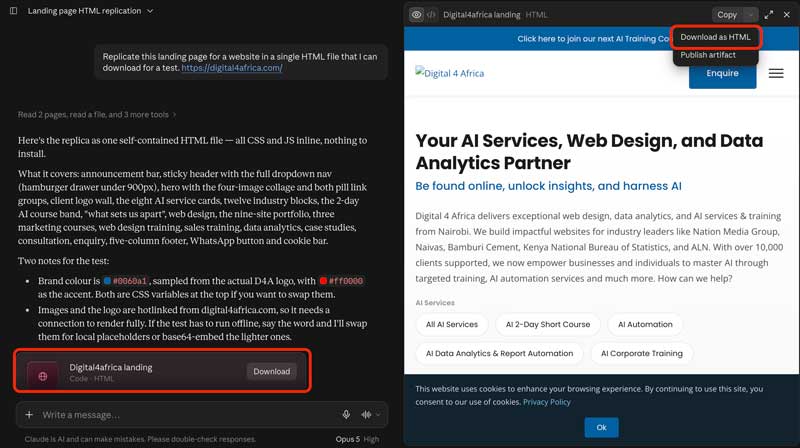
1. Get the file out of the AI tool. In Claude, open the artifact and use the download option to save the HTML. In ChatGPT, download the canvas or copy the code into a plain text file. Save it somewhere you will find it again.
A word of warning here. An artifact link is not a website. It opens inside the AI tool’s own viewer, on their address, and you cannot point your domain at it. That link is fine for showing a draft to a colleague. It is not something to put on a business card.
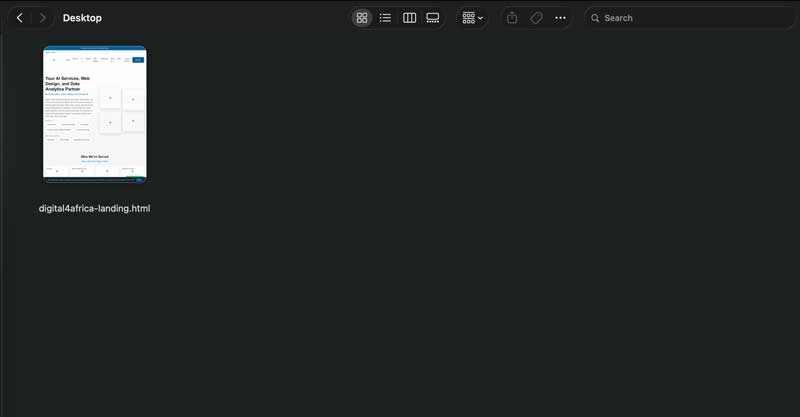
2. Rename the homepage to index.html. Web servers look for index.html by default. If your file is called landing-page-final-v3.html, rename it. This single step is the most common reason a correctly uploaded site shows a blank page or a file listing.
3. Buy a domain and a hosting plan. Buy both from the same provider if you can, because it saves you the DNS step entirely. Most shared plans include a free domain for the first year, a free SSL certificate and business email. Check the renewal price before you pay. Our hosting guide covers what else to look for.
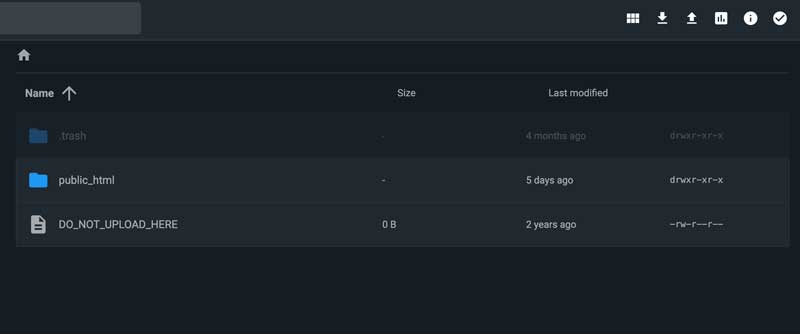
4. Open File Manager and find the public folder. In your hosting control panel, open File Manager and look for public_html. That folder is your website. Anything you put in it is on the internet.
5. Upload your files. Upload index.html into public_html. If you have a folder of files, upload the whole folder and keep the structure exactly as it was, then move the contents up so index.html sits at the top level of public_html rather than inside a subfolder.
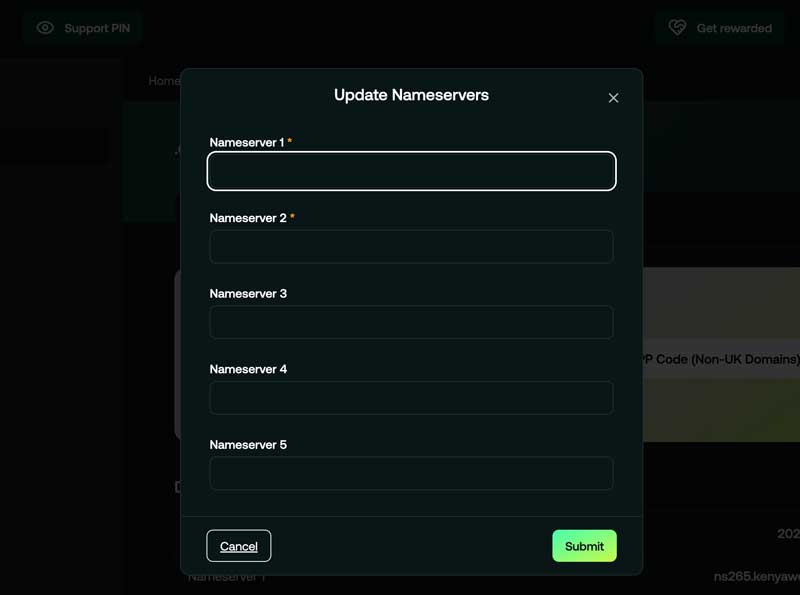
6. Point your domain at the hosting. If you bought both together, this is already done. If not, log in to your registrar and change the nameservers to the ones your host gave you. Then wait. DNS changes take anywhere from a few minutes to a few hours to spread. This is normal and there is nothing to fix during the wait.
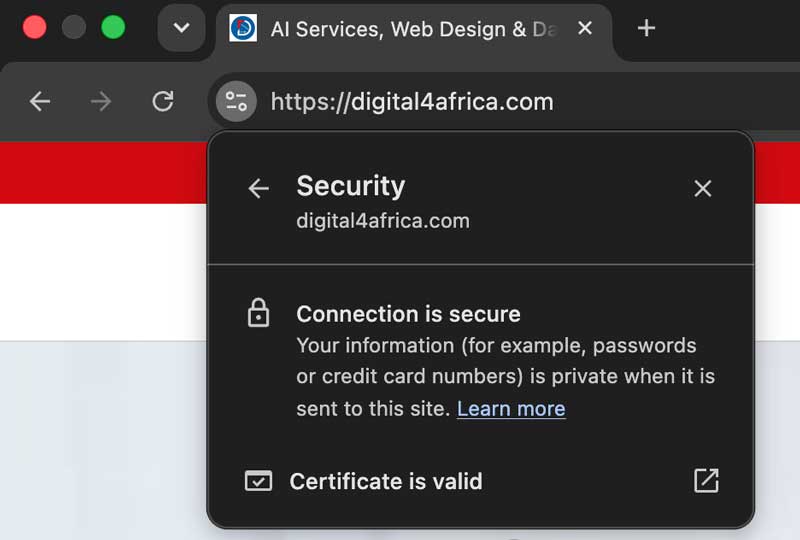
7. Turn on SSL and check it on a phone. Switch on the free SSL certificate in your control panel so your address loads as https:// with a padlock. Browsers warn visitors away from sites without one. Then open the site on your phone. AI tools are good at desktop layouts and less reliable on small screens, and most of your visitors will be on a phone.
That is it. You now own a website, and there is no subscription in the middle of it.
How to Take a Lovable or Base44 Project Off the Platform
If you built an actual application, you have two honest routes.
Route one: connect your domain inside the builder
The simplest option. The builder keeps hosting the app, you just put your own name on it.
In Lovable, go to Project, then Settings, then Domains, and add your domain. This requires a paid plan. The builder will show you the records to create at your registrar. For a subdomain like app.yourbusiness.co.ke you add a CNAME. For the root domain you add an A record pointing at the builder’s IP, plus a TXT record to verify you own the domain.
Type    Host    Value
A       @       185.158.133.1
TXT     @       (verification string from your builder)
CNAME   www     (your project URL)
Two things go wrong at this step, and they account for most of the support tickets.
Your old website keeps showing. This is almost always leftover A, AAAA or CNAME records from a previous host still sitting in your DNS. Delete the old records for that host so only the new ones remain, then wait for propagation.
You see a Cloudflare error 1001 or 1003. If your DNS is managed by Cloudflare, those errors come from Cloudflare’s proxy rather than from your builder. Open the DNS settings and switch the relevant records from Proxied, the orange cloud, to DNS only, the grey cloud. Wait a few minutes and try again.
Route two: export the code and host it yourself
Better if you want to own the thing outright.
Connect your project to GitHub from inside the builder. In Lovable this is a paid feature. In Base44, GitHub sync pushes the full source, frontend and backend, into your own repository at any time. Once the code is in GitHub, connect that repository to Netlify, Vercel, Cloudflare Pages, or a host that supports Node.js applications, and deploy from there.
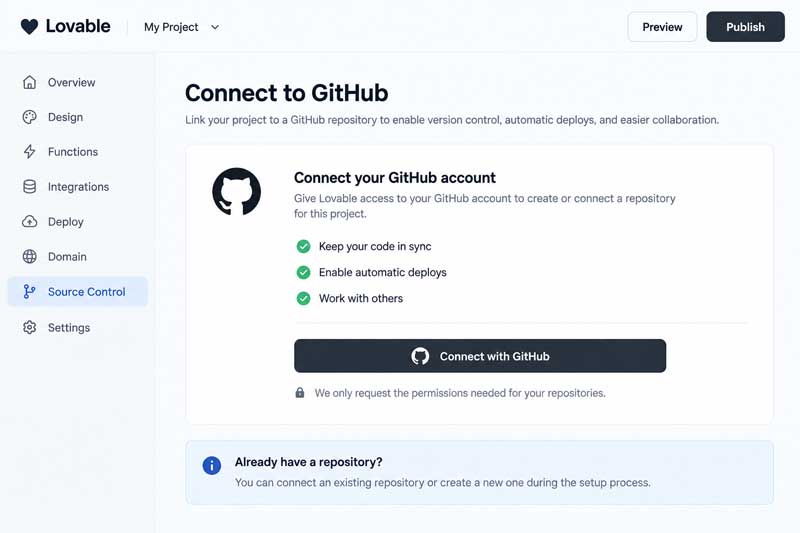
Set the project name before you connect, and do not rename or move the repository afterwards, because the sync between the builder and GitHub breaks when you do.
If your app has a database or logins, moving it is a real migration rather than a file copy, and the backend needs somewhere to live. That is the point at which it is worth talking to someone. It is part of what our AI software development team does.
What Actually Goes Wrong
We see the same three problems over and over, in the same order. None of them is a coding problem.
1. The cost assumption
By far the most common. Someone builds a site with a free AI tool and reasonably concludes the whole project is free. Then the domain costs money. Then the builder wants a paid plan before it will accept that domain. Then they want business email on the same domain, which is another line item.
Nothing here was mis-sold. The free part was real. It just ended earlier than expected, and the budget was never set because nobody thought there would be one. Decide what you are willing to spend for year one and year two before you start building, not after.
2. Getting online
The second pattern. Someone builds a genuinely good site in Lovable, buys a domain from a registrar, and then stalls completely at the DNS screen. Or they get the site live and then discover that business email on that domain is a separate setup they have not done and do not know how to do.
The build was never the hard part. Connecting a domain, configuring DNS and adding email is a different skill, and it has nothing to do with how well you can prompt. This is the single most common reason a finished vibe-coded site sits unlaunched for months.
3. The wrong tool
The third, and the most expensive. People end up on tools that do not suit them. The most costly version we see regularly is buying Google Workspace through a third party when buying it directly from Google would have been cheaper and simpler to manage. The same pattern shows up with hosting, with the top-tier builder plan bought when the entry plan would have done, and with a VPS bought by someone who needed shared hosting.
The fix is boring and it works: decide what the site actually has to do before you shop, then buy the smallest thing that does it.
There is a fourth issue worth naming, less common but more serious. AI-generated code ships with security gaps, most often keys and credentials left sitting in the code where anyone can read them. If your site takes payments, stores customer information, or has user logins, have someone look at it properly. That is what our website security audit is for.
Five Vibe-Coded Sites Worth a Look
Vibe coding gets dismissed as a toy. It is worth looking at what people have actually shipped. Note that most of the figures below are reported by the founders themselves rather than independently audited, and viral revenue moves fast, so treat them as indicative.
fly.pieter.com. Pieter Levels built a browser-based flight simulator in roughly three hours using Cursor, and it reached a $1 million annual run rate. It is the most-cited vibe-coding story there is. The honest footnote is that Levels himself later classed it as a project that made money without being sustainable, which is a useful correction to the hype.
Plinq. A women’s safety app, and the clearest documented example of something substantial built by a non-developer. Lovable published it as a case study.
Vibe Sail. Nicola Manzini’s browser sailing simulator, built with Three.js and GitHub Copilot, with around 85% of the code AI-generated. Founder-reported earnings of roughly $8,000 a month.
InteriorAI. Also Pieter Levels. Upload a photo of a room, pick a style, get AI redesigns back. Crossed seven-figure annual revenue within 18 months, run by one person.
ChatIQ. Kevin Volkis built an AI customer support tool with roughly 80% of the code generated by Claude and GPT-4. Over 11,000 users and around $2,000 in monthly recurring revenue, founder-reported. Volkis is not a developer.
The pattern across all five is worth more than the numbers. Every one is a narrow idea, launched fast, then improved. None of them won because of the code.
Before You Go Live
A short list. Work through it before you tell anyone the site is up.
Make sure the domain is registered in your name. Not your developer’s name, not your agency’s, not your cousin’s. Ask for the registrar login and check the registrant details yourself. Domain ownership disputes are miserable and entirely avoidable.
Know where your backups are. Builders and hosts handle this differently, and some do not handle it at all. If the answer is “I do not know”, download a copy of your files today.
Check the security basics. No API keys or passwords sitting in the code. HTTPS on. If the site takes payments or stores personal data, get it looked at properly, and remember that Kenya’s Data Protection Act applies to you the moment you start collecting customer details.
Do the SEO and GEO work the AI skipped. Almost no AI-built site arrives with a proper title tag, a meta description, one clear H1, or structured data. These are not optional extras. They are how Google ranks you and how ChatGPT, Gemini and Claude decide whether to mention you at all. A beautiful site that no search engine or AI assistant can read is a business card you never handed out.
Understand what happens if you stop paying. For builder-hosted sites, the answer is usually that the site disappears. Know that before it matters, not after.
So Which One Should You Pick?
You are testing an idea. Stay on the builder’s free plan, or put a single HTML file on a free static host. Pay for nothing yet. Buy the domain when you know the idea has legs.
You are a small business going live. Buy a domain and a shared hosting plan. You get the site, the email, the SSL and one provider to call, and you own the files. This is the right answer for most company websites, and it is the one we recommend most often. The Hostinger coupon code 1DIGITAL4AF90 takes 20% off if you go that way.
You are technical and the site is static. Cloudflare Pages, free, and stop thinking about it. Unlimited bandwidth and a custom domain at no cost is hard to argue with.
You built a real application with users and data. Keep it on the builder while it is small, and move to a VPS or a proper application platform when it grows. Get help with that move rather than learning server administration during a launch.
Still unsure? Tell us what you have built and what it needs to do, and we will point you at the right setup, whoever provides it. Start with our hosting page, or just get in touch.
Frequently Asked Questions
Can I host a vibe-coded website for free? Yes, if it is a static site. Cloudflare Pages, Netlify, Vercel and GitHub Pages all host static sites free with a custom domain and SSL. You still pay for the domain itself. Applications with logins or databases cannot be hosted free in any sustainable way.
Do I need to know how to code? No. Uploading an HTML file through a hosting control panel needs no coding at all. Connecting a domain needs patience rather than skill. Exporting an app from a builder to GitHub is more involved, but it is still following steps rather than writing code.
Can I use my own domain on a free Lovable plan? No. Free Lovable projects run on a lovable.app subdomain only, and they are public. Connecting your own domain requires a paid plan, as does exporting your code. If owning your work matters, factor that in before you build.
Do I need GitHub? Only for some routes. Uploading files to shared hosting needs no GitHub. Most free static hosts expect it, though Netlify and several paste-and-publish services accept a direct folder upload. Exporting an app from a builder almost always goes through GitHub.
Can I pay for hosting with M-Pesa? With local Kenyan hosts and registrars, yes, and most accept it. International hosts generally bill in dollars by card. If every renewal needs to come off your phone, choose a local provider from the start rather than discovering the problem at renewal.
Is a vibe-coded website good for SEO? It can be, but not by default. AI tools rarely produce proper title tags, meta descriptions, a single clear H1 or structured data, and they often generate heavy pages that load slowly. Fix those and a vibe-coded site competes with any other site.
What happens if I stop paying my builder subscription? Usually the site goes offline and your custom domain stops resolving. If you exported the code to GitHub while the subscription was active, you can redeploy elsewhere. If you never exported, you may have nothing to move. Export early.
Can I move my site later? Yes, if you own the files. A static site moves in minutes. An application with a database is a real migration and takes planning. The easiest way to keep the option open is to connect your project to GitHub on day one.
Get Your Vibe-Coded Site Properly Online
Vibe coding has genuinely changed who can build a website. What it has not changed is everything that happens after the build: the domain, the DNS, the email, the SSL, the backups, the renewal in year two.
That gap is where good projects go quiet. Someone builds something worth launching, then loses a month to a nameserver screen and never quite gets back to it.
You do not need to be that person. If you have built something and you are stuck, talk to us. We will tell you what it needs, what it should cost, and who should provide it, even when the answer is not us.
Some links on this page are affiliate links. If you buy through them, we may earn a commission. It costs you nothing extra, and we tell you plainly when a cheaper or better option exists.
Written by Brian Wamiori. Last updated: September 2026. Prices checked September 2026 and subject to change.